

How Pricing Works
Every price in your store is built from a supplier cost. Malovex takes that cost, converts it into your store’s currency, applies your price rules, and produces a final selling price for each customer group. This happens automatically — Malovex recalculates your prices after each supplier sync, and again whenever you change a rule, so your store always reflects current costs.
This page explains the steps a price goes through, in order. The later pages in this section cover each step in detail.
The pricing pipeline
Section titled “The pricing pipeline”For a single product, Malovex builds each price like this:
-
Pick the base cost. When the same product comes from more than one supplier, Malovex picks which supplier’s cost to start from. By default it uses the cheapest, but you can change this — see Price Basis.
-
Prefer your own stock. If you hold your own stock of the product, your own cost becomes the base instead of any supplier — while you have units on hand. This is Sell-Own-First.
-
Convert to your store currency. If the base cost is in a different currency than the store, Malovex converts it using your exchange rates — before any rules are applied.
-
Apply your price rules. Each applicable price rule runs in order on the running price — marking it up, discounting it, or setting a fixed price — until the chain finishes.
-
Repeat per customer group. Steps 1–4 run once for every active customer group, so a product can carry a different price for each group.
The result is a set of final prices — one per customer group — that your storefront and the Prices API read.
When prices are recalculated
Section titled “When prices are recalculated”You never have to trigger pricing by hand for it to stay current. Malovex recalculates automatically:
- After each supplier sync, so new costs and stock flow straight through.
- When you change a price rule, customer group, or exchange rate.
- When you publish a custom product or adjust your own stock.
You can also force an immediate recalculation from My Products — either Reindex on a single product, or Reindex now for your whole catalog (subject to a short cooldown). See My Products.
How was this price calculated?
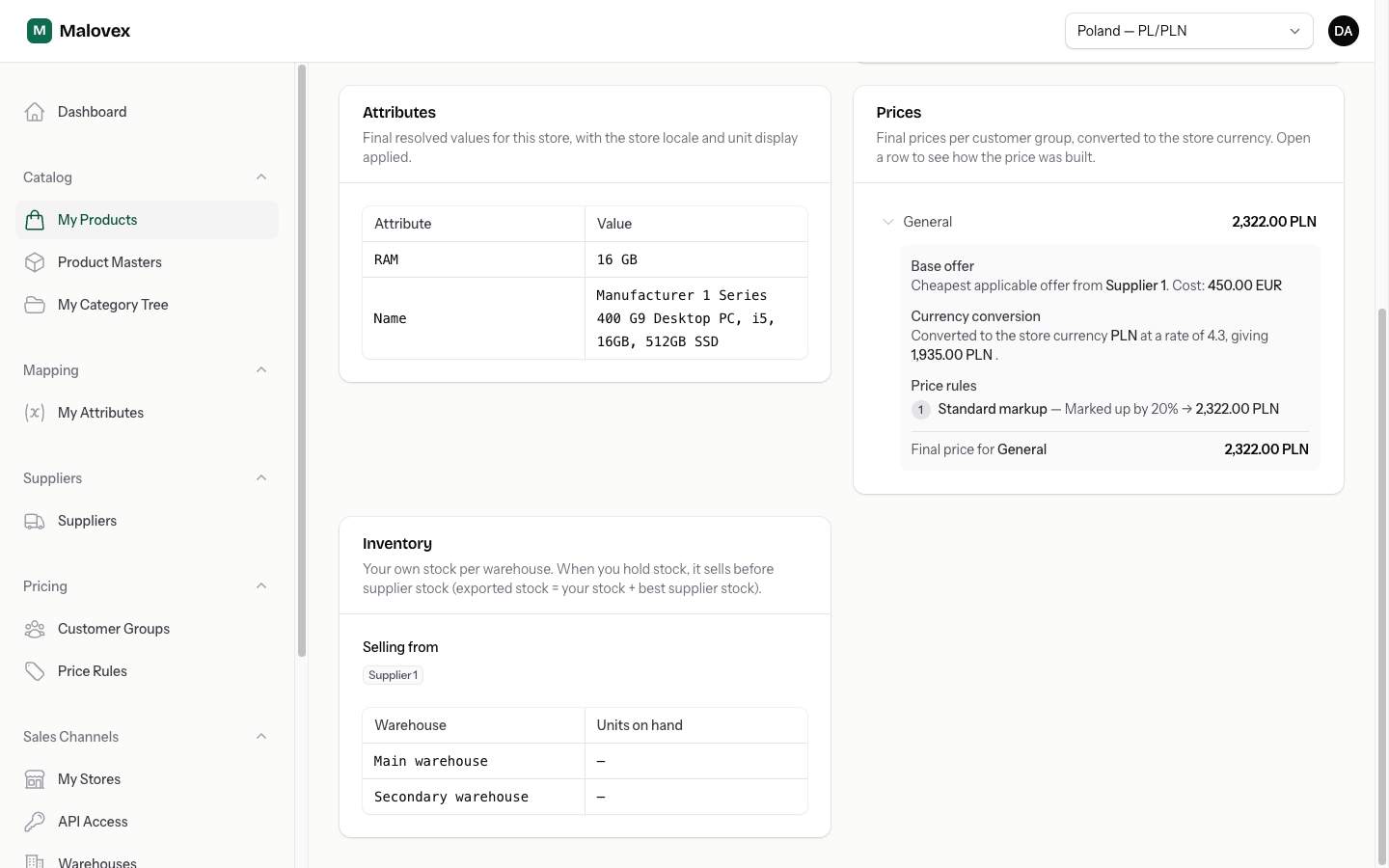
Section titled “How was this price calculated?”Because pricing has several steps, Malovex shows its work. On any product’s page in My Products, the Prices section lists the final price per customer group; open a row and Malovex walks you through exactly how that number was built:
- The base offer — which supplier the cost came from (or My Inventory when you’re selling your own stock), and the original cost.
- Currency conversion — the original cost and currency, the rate applied, and the converted cost in your store currency. Shown only when a conversion happened.
- Price rules — each rule that applied, in order, with a plain-language effect (for example “Marked up by 20%”) and the running price after it.
- The final price for that group.
Where to go next
Section titled “Where to go next”- Price Basis — choose which supplier cost your prices start from.
- Price Rules — build the markups, discounts, and fixed prices that shape your margins.
- Customer Groups — give different customers different prices.
- Currency & FX — set the exchange rates used to convert supplier costs.